Email forwarding that checks before it delivers.

Canyon Relay routes mail sent to your domain to the inboxes your team already uses. Every message is checked against Google Safe Browsing and scored for spam on the way through, and your team can manage it all without touching DNS.

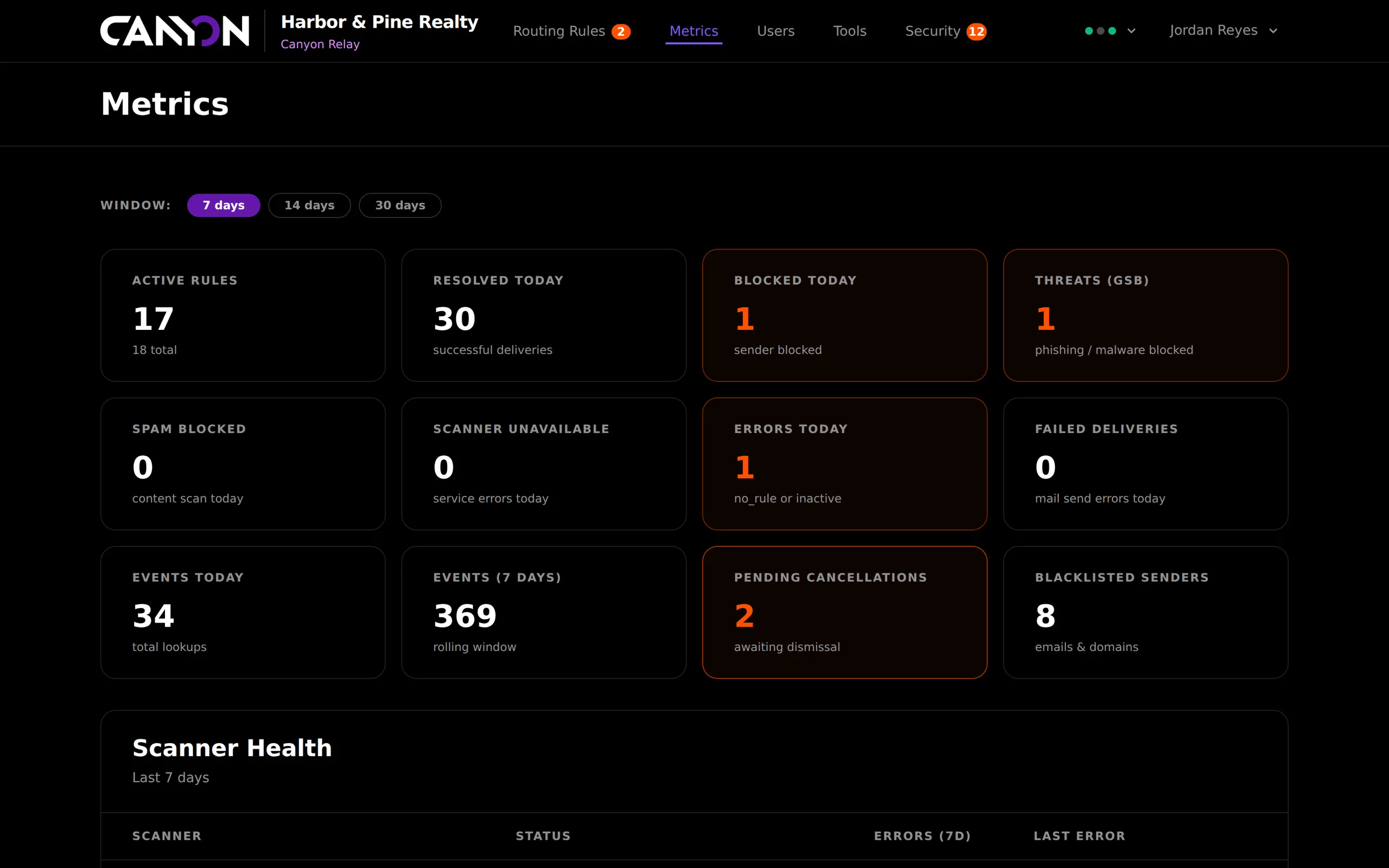
Canyon Relay metrics dashboard for a real-estate client showing active rules, deliveries, blocked senders, phishing threats, spam, errors and pending cancellations.
Destinations per alias
10
Links checked per message
500
Delivery retries with backoff
3×
Scanner self-test with known-bad samples
Daily

Why we built it

Forwarded mail is where phishing slips through.

Plenty of businesses run on forwarding. info@ goes to the front desk’s Gmail, listings@ to three agents, invoices@ to the bookkeeper. Plain forwarding passes along everything it receives, including the wire-fraud email with a lookalike link. Nobody can say where an address actually goes, and nobody remembers who set it up.

Relay makes forwarding something you can see and control. Each alias is a rule you can search, switch off and audit. Every inbound message is checked for dangerous links and spam before delivery, and anything blocked waits in a review queue where one click allows or blocks that sender for good.

What it does

Everything Relay handles for you.

Aliases & routing rules

Map any address on your domain to up to ten inboxes, with a description, an on-off switch and a history of every change.

Phishing & malware scanning

Every link in every message is checked against Google Safe Browsing for malware, social engineering and unwanted software.

Spam scoring

A built-in scorer looks for scam phrases, shouting subjects, URL shorteners and link stuffing, with OOPSpam available as an extra layer.

Sender allow & block lists

Block or trust an exact address or a whole domain. Recipients can report a sender from any forwarded email, and it is blocked straight away.

Metrics & health

Daily volume, top aliases, event breakdowns and live status for Safe Browsing, spam scanning and delivery.

Audit trail & roles

Every rule, user and sender-list change is logged with who made it, their IP and a field-by-field diff. Staff and admin roles, with no public sign-up.

Product tour

Inside Canyon Relay real screens.

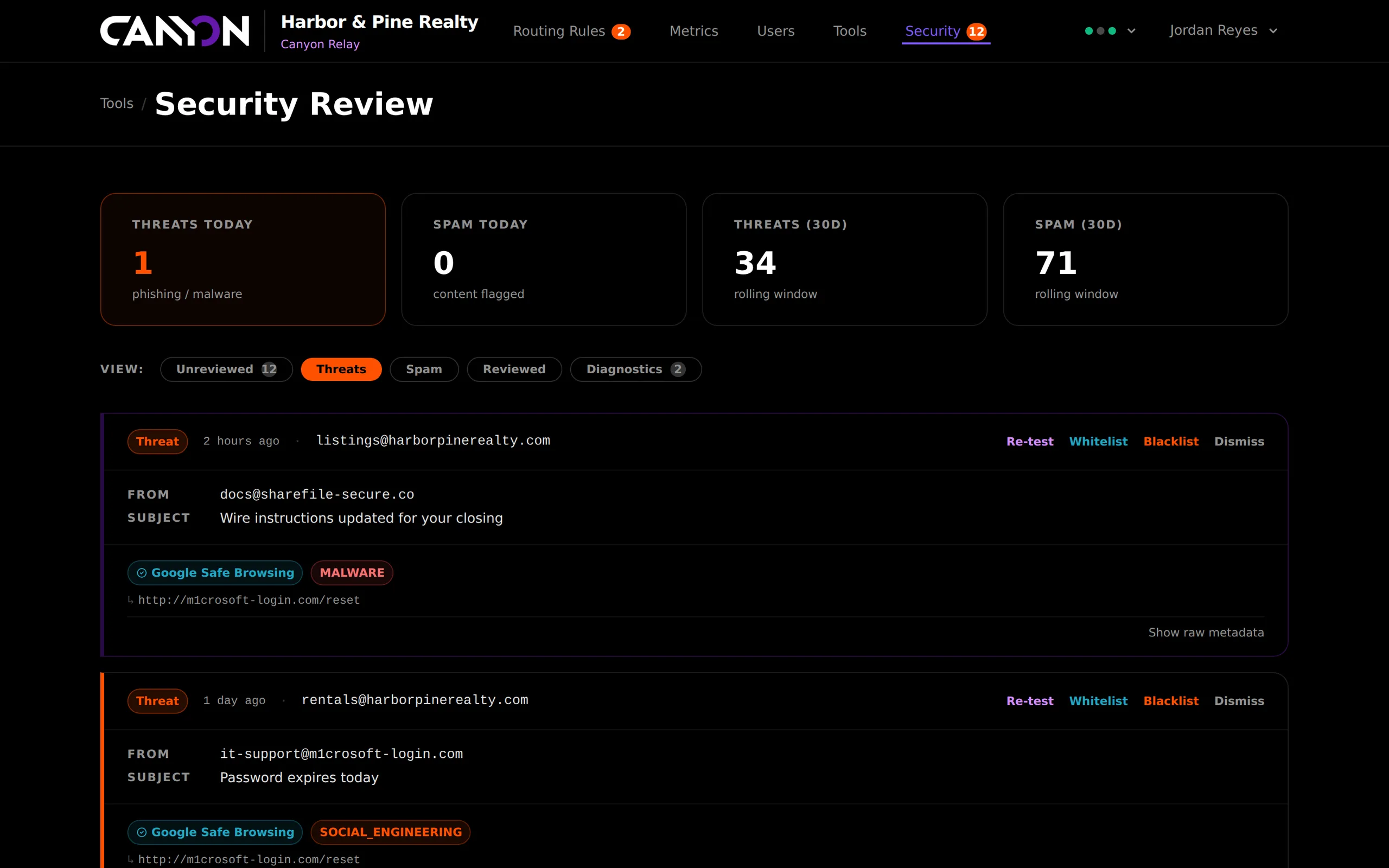
Canyon Relay security review queue listing blocked phishing emails with sender, subject, the Google Safe Browsing threat type and the flagged URL, with re-test, whitelist, blacklist and dismiss actions.

Security review

Blocked mail waits for a decision

Anything Relay blocks lands in a review queue with the sender, subject, alias, and the exact link or spam signal that tripped it. Allow the sender, block them for good, re-test the links or dismiss the event. The unreviewed count sits in the navigation, so nothing is left in the queue for weeks.

  • Tabs for unreviewed, threats, spam, reviewed and diagnostics
  • Threat type and URL for each Safe Browsing match
  • Spam score, threshold and the reasons behind it
  • Re-test a message’s links on demand
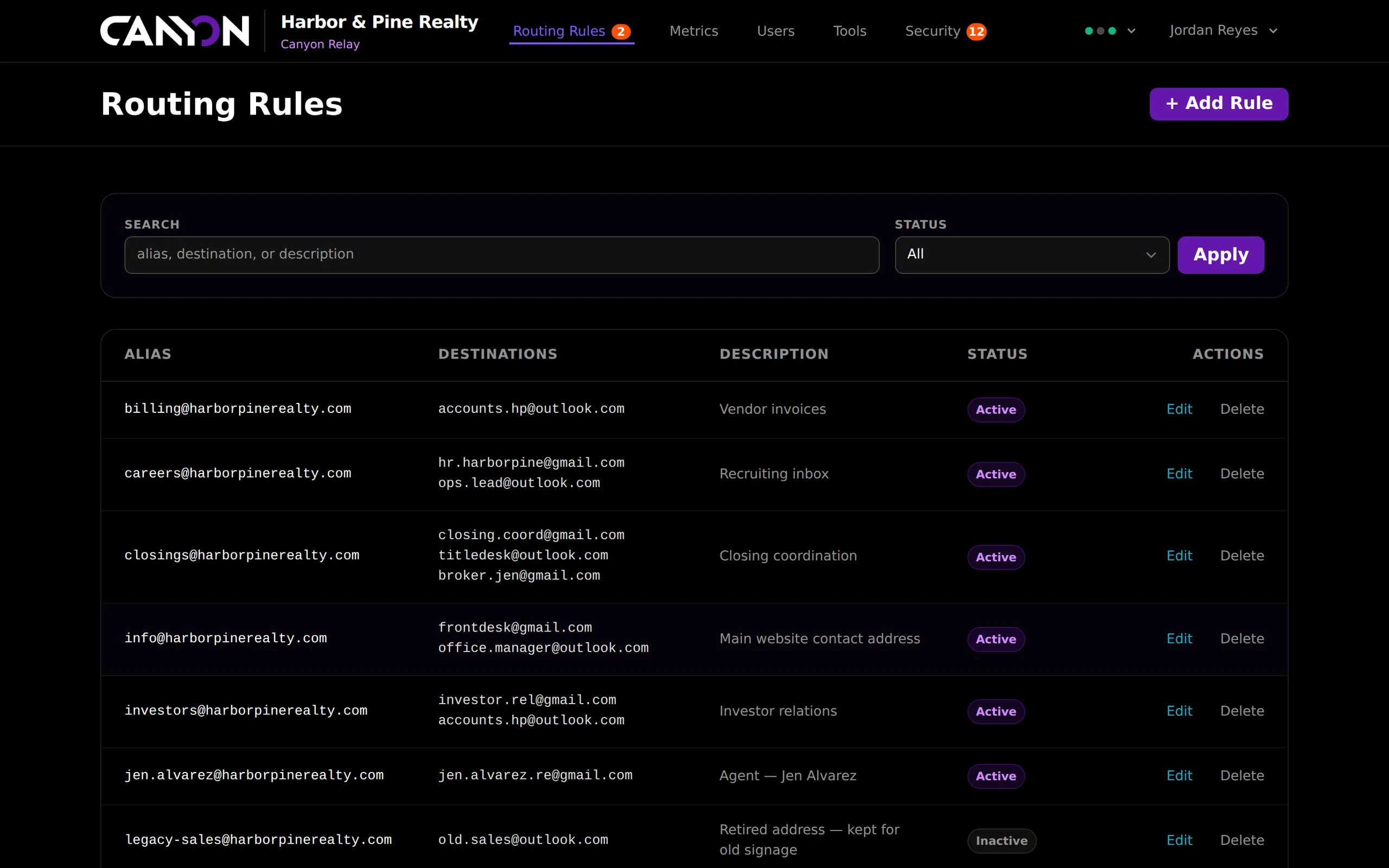
Canyon Relay routing rules list showing aliases on a client domain, the inboxes each one forwards to, a description and active or inactive status.

Routing rules

Every address, and where it really goes

All of your aliases in one searchable list: where each one delivers, what it is for and whether it is live. Switch a retired address off without deleting it, or paste a whole list to import in bulk. Relay previews each line before anything is written, and imports in a single transaction.

  • Search by alias, destination or description
  • Bulk import with a create, exists or error preview
  • Each rule’s own event history and audit log
  • Optional allow-list of domains an alias may use
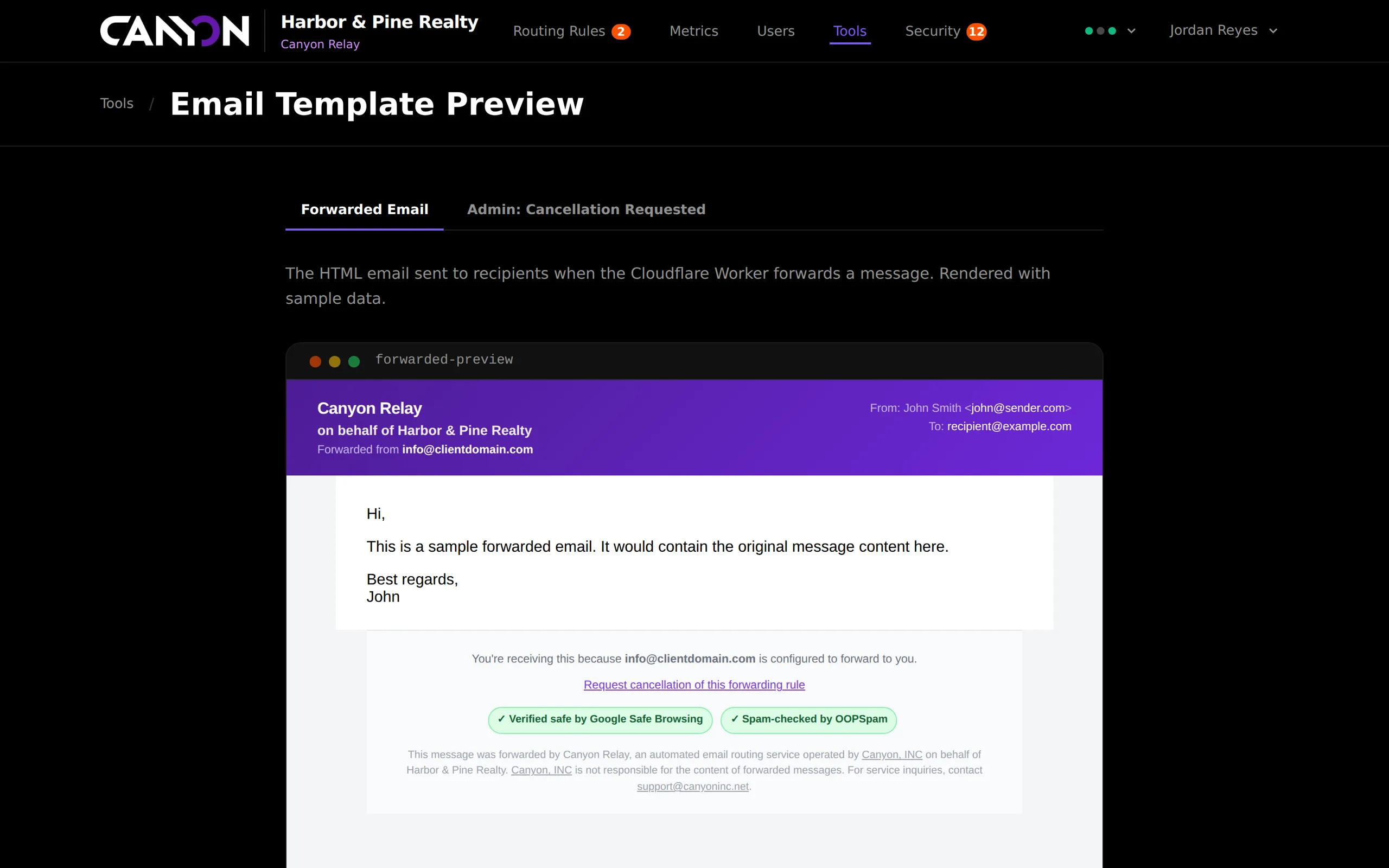
A forwarded email wrapped in Canyon Relay branding for a client, showing the original sender, a cancellation link, and badges confirming the message was checked by Google Safe Browsing and OOPSpam.

Branded delivery

Forwarded mail that explains itself

Every delivered message arrives in a clean branded wrapper: who it was forwarded for, which alias received it, and a badge for each scan it passed. Reply-To points at the original sender, so replying just works. Each email also carries signed links to report the sender or request removal from the forward.

  • White-labelled per client, with your name, support email and vendor line
  • Scan badges shown only when that scan actually ran and passed
  • Original HTML sanitised with an allowlist before delivery
  • Attachments forwarded intact, up to 10 files

Under the hood

How it works.

Received at the edge

Inbound mail arrives at a Cloudflare Email Worker, which parses the message and hands it to Relay over an authenticated, rate-limited API. With no matching rule, the message is refused at SMTP rather than silently dropped.

Cloudflare Email WorkersToken authRate limitedSMTP rejects

Layered checks, in order

The block list is checked first, then the allow list, then Google Safe Browsing on every link, then spam scoring. Each decision is recorded as an event with its reasons, so a blocked message can always be explained.

Block listAllow listSafe BrowsingSpam score

Delivery that retries

Each destination is delivered as its own queued job with three attempts and increasing backoff, so one bad inbox never holds up the others. Bounces and complaints come back through a signed Mailgun webhook.

Per-destination jobsBackoffBounce trackingSigned webhooks

Security & reliability

Built to be trusted.

Built with

  • Cloudflare Email Workers
  • Laravel
  • Google Safe Browsing
  • OOPSpam
  • Mailgun
  • HTMLPurifier
  • Alpine.js
  • Tailwind CSS

Fails open, never loses mail

If a scanning service is unreachable, mail still gets delivered and the outage is logged and shown in the health indicator. A third-party hiccup never becomes a missing email.

Scanners test themselves daily

Every morning Relay sends Google’s official malware test URL and a known spam sample through its own scanners, and confirms both are caught.

Privacy-minded scanning

When the optional spam API is used, it sees only the first 1,000 characters of a message, never the sender’s IP, and its logging is switched off.

Tamper-proof self-service

Report and cancellation links are signed and expire. Webhooks are HMAC-verified with replay protection, and API tokens are compared in constant time.

Canyon Relay questions

What is Canyon Relay?
Canyon Relay is a secure email routing platform built by Canyon. It forwards mail sent to addresses on your domain to the inboxes your team already uses. On the way, it checks every link with Google Safe Browsing and scores the message for spam.
How is Relay different from normal email forwarding?
Plain forwarding passes on everything, including phishing. Relay scans each message before delivery, blocks dangerous links and likely spam, holds them for review, and keeps an audit trail of every rule change. Your team can see and control where every address goes.
Will a scanner outage stop our email?
No. Relay fails open: if Google Safe Browsing or the spam service cannot be reached, mail is still delivered and the outage is logged and shown on the health indicator.
Can recipients report a suspicious sender?
Yes. Every forwarded email includes a signed “report this sender” link. Using it blocks the sender immediately and notifies your administrators.
Does Relay replace our mailboxes?
No. Relay routes mail to the mailboxes you already have, whether that is Gmail, Outlook or anything else. It adds scanning, control and visibility in front of them.
Can Relay carry our branding?
Yes. Each deployment is white-labelled with your organisation’s name and support contact, shown in the admin and on every forwarded email.
See Canyon Relay on your own setup.

Tell us about your sites, locations or inboxes. We will walk you through the platform and give you a straight answer on fit, timeline and cost.